Discover the free App for SEO & AEO on Webflow
What is the Webflow MCP Server?
The Webflow MCP Server is an official integration that allows AI assistants like Claude to directly access and manage your Webflow site.
It connects Claude to your pages, CMS collections, assets, components, and settings in a secure way. This enables SEO tasks to be executed through natural language instead of manual workflows.
To get started with the Webflow MCP server:
What problem does MCP solve for SEO teams?
MCP removes the gap between SEO strategy and execution.
Instead of exporting data, writing scripts, or navigating the Webflow UI, you can describe what you want to do and let the AI handle the implementation.
In short, you focus on SEO strategy and let Claude do the operation work.
This reduces friction, saves time, and enables complex SEO operations to be completed in minutes rather than hours.
For example, you can ask Claude the following:
Audit my Webflow site and give me a prioritized list of SEO issues to fix.

Run a site audit and compare my current setup against Webflow SEO best practices.

Check my site structure and tell me if any pages are more than 3 clicks from the homepage.
What is the Model Context Protocol (MCP)?
The Model Context Protocol is an open standard developed by Anthropic that defines how AI models connect to external tools and data sources.
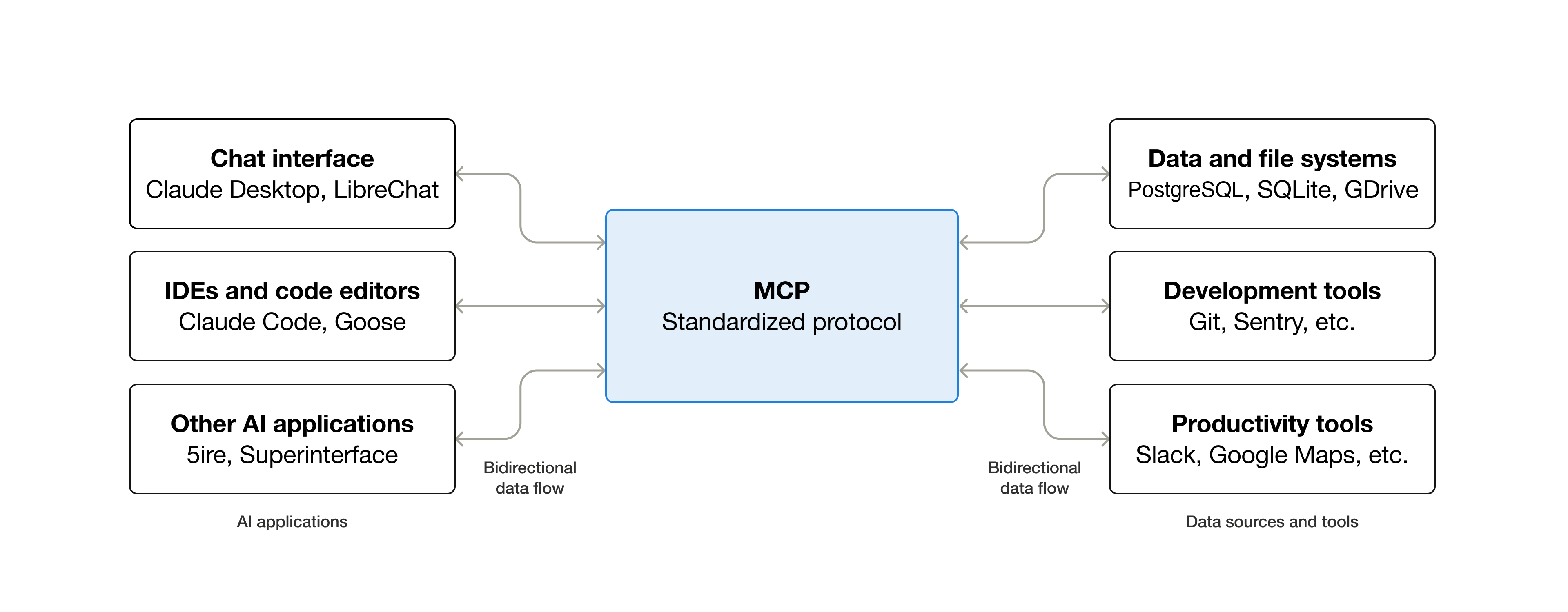
It acts as a secure interface between Claude and platforms like Webflow, allowing the AI to read, analyze, and update structured content safely.
How does MCP work with Webflow?
Webflow exposes an MCP server that Claude can connect to once authenticated.
After authorization, Claude can:
- Read site structure and CMS data
- Analyze content and assets
- Make controlled updates
- Prepare changes for publishing
All actions follow explicit permissions and confirmation steps.
You can get a better grasp of all the action on the Webflow MCP server documentation
What SEO tasks can Claude perform in Webflow?
Claude can execute a wide range of SEO tasks once connected through MCP.
These include site audits, content updates, technical fixes, and structured data management.
What are Claude Skills?
Claude Skills are pre-built agent capabilities designed for common Webflow tasks. It is built on Anthropic’s open Agent Skills format and specific to Webflow.
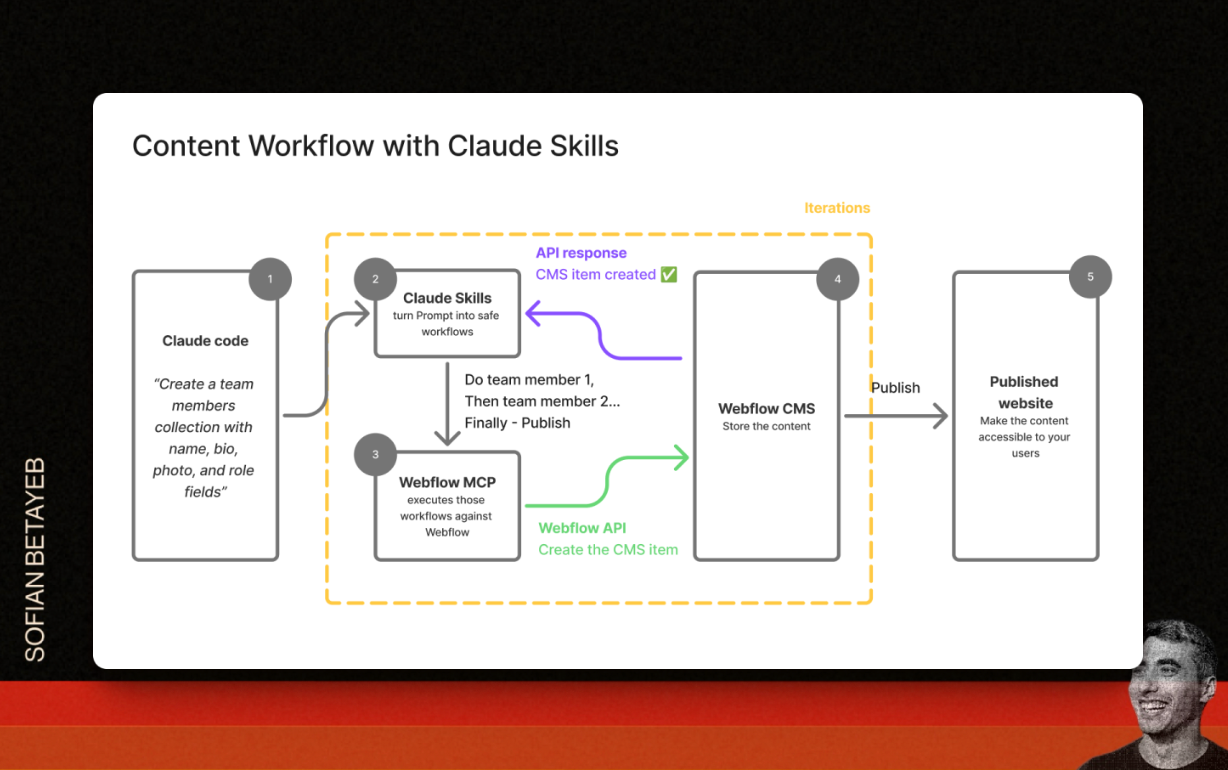
How can Claude skills improve image SEO in Webflow?
Webflow maintains all Claude Skills in a public GitHub repository.
You can explore the code, understand how each workflow is built and contribute improvements or report issues.
1) Content management for Webflow
Create a team members collection with name, bio, photo, and role fields

Update all blog post for 2026
2) Site health & optimization for Webflow
Audit my site and show me the top issues to fix

Run a complete link check on my site and fix any issues
3) Publishing & code
Add Google Analytics tracking to my site

Show me my last changes and publish if it looks good
How does Claude skills detect broken links?
Claude can crawl your site and validate all internal and external links.
Let's quickly review the Github page for the broken link skills.
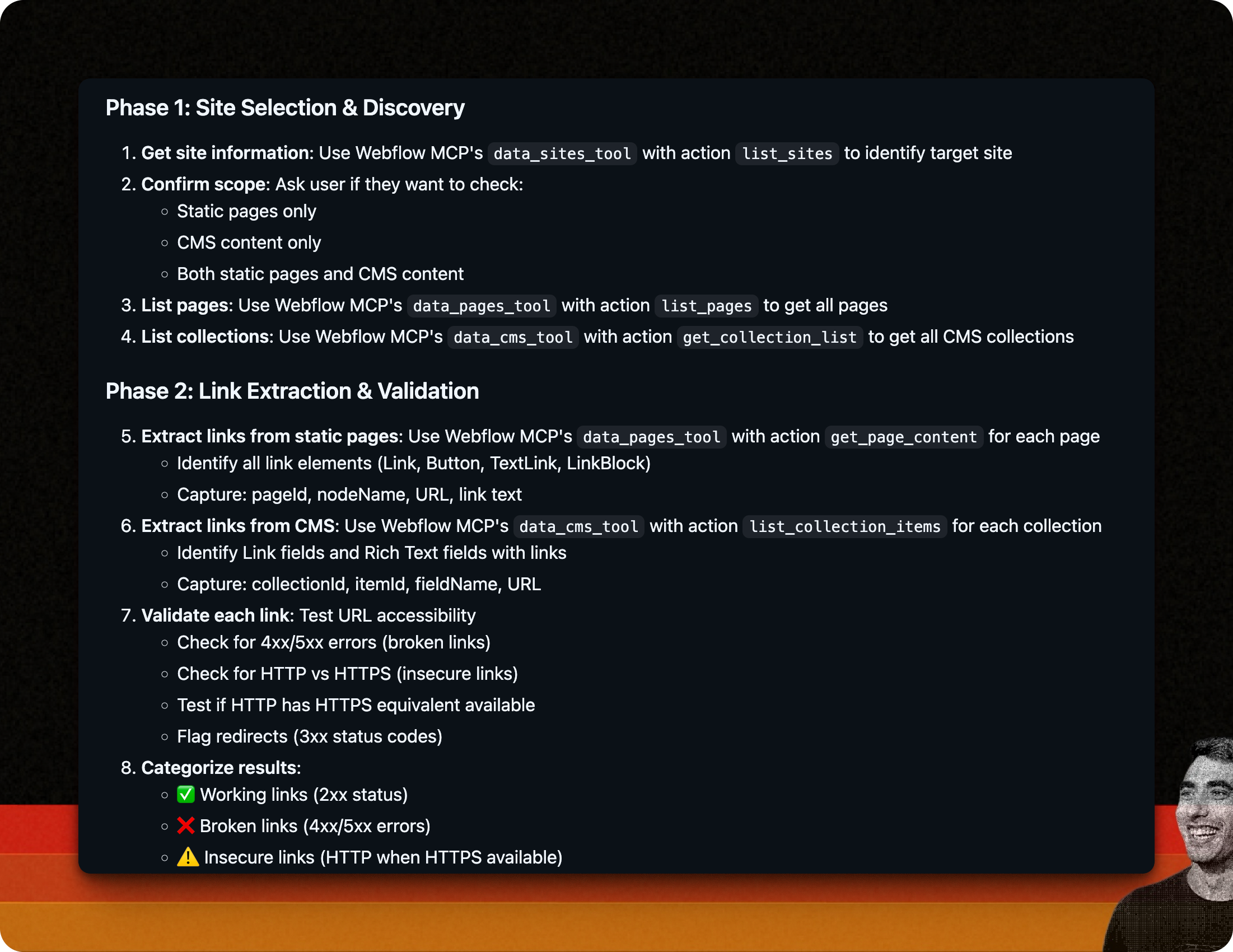
It detects:
- Internal 404 errors
- Broken external links
- Mixed HTTP and HTTPS content
- Invalid links inside CMS rich text fields
This helps prevent SEO and UX issues caused by dead links.
What is the list of Skills for Webflow SEO?
Claude can create, update, and optimize CMS collections. And much more...
Available Skills
Content Operations
bulk-cms-update: Create or update multiple CMS items with validation and preview

Use when: Batch creating/updating blog posts, products, team members
Requires: Collection name, item data
Safety: Preview + confirmation required
cms-collection-setup: Create new CMS collections with custom fields and relationships

Use when: Setting up new content types (blog posts, products, team members, portfolios)
Supports: 16 field types (static, option, reference/multi-reference), relationship management, multi-collection setup
Features: Validates schemas, checks plan limits, handles dependencies, creates fields in correct order
Safety: Complete preview with validation, explicit confirmation required
cms-best-practices: Expert guidance on CMS architecture, relationships, and optimization

Use when: Planning CMS structure, optimizing performance, troubleshooting relationships
Type: Consultative (read-only, provides recommendations)
Output: Architecture recommendations, performance optimization, field selection guidance
Publishing
safe-publish: Plan → Confirm → Publish workflow with verification
Use when: Publishing site changes to production
Process: Shows what changed → Requires "publish" confirmation → Verifies deployment
Safety: Explicit confirmation required (must type "publish")
Site Management & Auditing
site-audit: Comprehensive site audit with health scoring and actionable insights

Use when: Assessing overall site health, preparing for launch, identifying issues
Analyzes: SEO metadata, CMS content quality, page structure, site configuration
Output: Health score (0-100), prioritized issues, recommendations, optional export
asset-audit: Analyze assets for optimization opportunities

Use when: Site performance issues, preparing for launch, reducing load times
Analyzes: Image sizes, file formats, compression opportunities
Output: Optimization suggestions, potential file size savings, recommendations
link-checker: Find and fix broken or insecure links across entire site

Use when: SEO audit, site maintenance, after content migration
Analyzes: All links in static pages and CMS content
Detects: Broken links (4xx/5xx), insecure HTTP links, redirects
Output: Link health score, automatic fixes (HTTP→HTTPS), manual review items
Safety: Preview + granular approval for fixes
Design & Naming Systems
flowkit-naming: Apply Webflow's official FlowKit CSS naming system
Use when: Building components with FlowKit conventions, auditing class names
Requires: Webflow Designer connection
Patterns: fk- prefix, is- state modifiers, responsive combo classes
Safety: Preview + confirmation for class creation/updates
Developer Tools
custom-code-management: Safely manage tracking scripts and custom code
Use when: Adding analytics, tracking pixels, third-party integrations
Manages: Site-level custom code, inline scripts (max 2000 chars)
Safety: Preview + confirmation before adding/removing scripts
Common use cases include:
- Creating blog posts with SEO fields
- Managing author profiles to support E E A T
- Structuring product collections for schema
- Performing bulk updates across CMS items
This is especially useful for large content sites.
How does the safe publish workflow work?
Claude follows a plan confirm publish approach.
Before going live, it:
- Shows what has changed
- Runs pre publish SEO checks
- Waits for explicit approval
This reduces the risk of accidental production errors.
How does Claude help with content gap analysis?
Claude analyzes your existing content coverage and structure.
It then identifies:
- Missing topics
- Overlapping content
- Opportunities for authority building
This helps guide editorial planning with real site context.
According to my articles, what are the missing items for my {INSERT MAIN TOPIC}
How to get started with Claude Skills for SEO?
You need 3 things.
- Claude Code : This is Anthropic’s official CLI tool "Getting started"
- Webflow MCP server: Installed and configured inside Claude Code.
- Webflow Claude Skills : Installed via the Claude Code marketplace.
What is the key takeaway?
Claude is no longer just a writing assistant.
With its Webflow skills, Claude becomes an SEO execution partner that can audit, manage content, and publish changes directly inside your site. Complex SEO tasks become simple conversations, while strategy and validation stay human-led.
Download the Webflow SEO Checklist for free
FAQs
Find answers to your most pressing questions about our AI SEO Copilot services.
Webflow MCP is used to connect AI assistants like Claude to a Webflow site so they can read, analyze, and update content, CMS data, assets, and settings. It enables SEO tasks to be executed through natural language commands instead of manual work.
Yes. Webflow provides an official MCP server that exposes site data and actions in a secure and controlled way. Access requires authentication and explicit permissions.
No. While SEO is a strong use case, MCP can also be used for content management, analytics setup, asset optimization, and operational site maintenance. SEO benefits because MCP allows AI to act directly on site structure and content
o. MCP allows you to describe tasks in natural language. Coding is not required, although technical knowledge helps with validation and strategy decisions.
No. MCP does not replace SEO tools. It complements them by executing tasks directly inside Webflow. Strategy, analysis, and prioritization still benefit from dedicated SEO platforms.
Still have question? let us know.
Download the Webflow SEO Checklist for free
Relateed
Discover more about AI and SEO strategies.